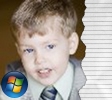
 The UPN show Veronica Mars opens with video of the various cast members and torn notebook pages showing their names. I was inspired by a post on the Windows Movie Maker forums, to create a similar look.
Note: These titles will work in WMM 2.1 (XP) and WMM 6.0 (Vista). I've provided XML for both versions in the installers.
Choose the correct 64-bit or 32-bit installer link below. Run the installer and it will install the custom XML code and the image files you'll need.
Blaine's Torn Pages (64-bit)To use the new title:
Blaine's Torn Pages (32-bit)
Would u be able to make something like the brady bunch begining
ReplyDeleteThanks for all the info!
ReplyDeleteThank you, thank you, THANK YOU VERY MUCH for all!!!!!!!!!!! :)
ReplyDeleteThat would be cool to do, but unfortunately Windows Movie Maker doesn't let you play with the sequence of frames to make things go backwards. If you want a method to go backwards, check www.rehanfx.org under his 'Tips & Tricks'
ReplyDeletethank you!
ReplyDeletei'm having some problems with it though. i downloaded some of your other effects, and they work when i open WMM, but when i downloaded this effect, it wouldn't show up as an effect on WMM. When i went into my AddOnTFX files, it was listed there. I have no idea what I did wrong, because I went through the same process with every one of the effects i downloaded from you.
any help please?
Thanks, could you do it like your boxed titles, with a lined page background?
ReplyDeleteI'm not sure if you are asking to put a solid color behind the text on these titles, or if you want to fill the full background with a lined page image on the boxed titles. You can put whatever image you want behind the boxed titles... or did you mean only behind the text?
DeleteNo, I was meaning fill the box with a lined paper background, so instead of it being torn, it would look almost, neat.
DeleteThat could be done... I don't have any time in the near feature to try this out, but you might try the Paint Splat titles, but replace the image with one with lined paper. That's kind of the look you would get.
Delete