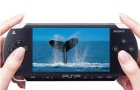
 Following my series of custom Movie Maker image overlays, here's an overlay where your video appears on the screen of a PSP. This looks best with widescreen video, but you can use standard 4:3 video too.
There are two installers depending on whether you are running on a 64-bit or 32-bit version of Windows. The installer will put the necessary files into, C:\Program Files\Movie Maker\Shared.
Blaine's PSP Overlay Title (64-bit)To use the new title
Blaine's PSP Overlay Title (32-bit)
Thanks I am going to use this overlay for my next video!
ReplyDelete-K
its not working
ReplyDeleteCan you post your exact symptoms in the forum thread? Let me know for sure you are using version 6.0 of Movie Maker (go to Help | About) and also, do you see the title as a choice in your animations. Any other clues too rather than just "it's not working"...
ReplyDeletethanks..for this BUT mind to ask how about like putting an effects of the subtitles??
ReplyDeleteAwsome! Alot of your effects woek for me. Plus there virus free!
ReplyDeleteAlso they don't take up a lot of memory in the computer!! U rock!!!
thank you for all of these very fine and useful effects and transitions.
ReplyDeleteyou have made using windows movie maker a fun and enjoyable expereance !
i am hoping someday that movie maker will have two time-lines...that would make editing a movie so much easier..especially music videos.
CAn you make a ipod one i need it for shnaty melody (replay)
ReplyDelete