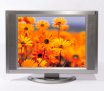
 One of the neat things you can do with custom titles is to resize the video and overlay an image. Using this technique, you can easily overlay an image of a TV screen, for example. (Click here for a sample video with a TV overlay).
Note: This title has been designed to work with either WMM 2.1 (XP) or WMM 6.0 version. It also works whether your project has a 4:3 or 16:9 aspect ratio.
There are two installers depending on whether you are running on a 64-bit or 32-bit version of Windows. The installer will put the necessary files into, C:\Program Files\Movie Maker\Shared.
Blaine's TV Overlay Title (64-bit)To use the new title
Blaine's TV Overlay Title (32-bit)
Awesome! Thanks a ton!
ReplyDeletehey there nice site but the dufult time for the tv is too short and a cant make it longer
ReplyDeleteThe duration can easily be changed for any title. Just open the timeline view and scroll down to the bottom track which is the "Title Overlay" track. Find the title and stretch it as long as you need, the length of the whole movie if you like!
ReplyDeleteWhat i mean is it's too small in title overlay
ReplyDeletebut iam fine i copyed and pasted it
Take the right edge of the rectangle in Title Overlay and stretch it to the right. That will make it longer... no need to copy it multiple times.
ReplyDeleteHi Blaine,
ReplyDeleteThanks very much for the TV overlay effect. It's great. I wonder, however, whether there is any way of making a different TV. I'm trying to make an old 1960s TV. However, Vista won't let me edit your TV. Any advice?
Oliver
Oliver, the problem is that Vista won't let you save directly in the AddOnTFX folder, but if you copy the image somewhere else, make the changes and copy it back, it will work. Just make sure the "screen" is in the exact same spot, or edit the Rectangle parameters in the XML.
ReplyDeletehey blaine !
ReplyDeletewill i be able to add texts on the top of the tv?
thanks!
I believe I made it so you can type text into the title and have it appear in the center of the TV screen. Have you tried it?
ReplyDeleteIt doesn't work for me, nor does the PSP one. It keeps saying I have an error! Please help. Thanks anyway Blaine!
ReplyDeleteWhat's the error? When do you see the error? I need more details to be able to help you.
ReplyDeleteNevermind! It turns out the next day when I turned WMM on, the T.V and PSP overlays were there! I guess it did work. I already used the T.V. one in a video of mine. It works great! Thanks Blaine!
ReplyDeleteyea i have vista, i downloaded it and didnt see it at all.
ReplyDeleteDo you have 32-bit Vista or 64-bit Vista? If you have 64-bit, try moving the AddOnTFX folder so it is under your 64-bit version of Movie Maker.
ReplyDeletehey blaine,
ReplyDeleteI first off wanted to thank you for all of these custome effects! they are helping me so much! I have a question/request because i am not program literate at all, but is there anyway a dark background version could be made? I'm doing a film that has a scene in a security room with camera feeds, but it's kinda dark.
sincerely,
Bethkrager@yahoo.com
You can do this with almost any image that has a rectangular area. Basically all that is happening is that a static image of a TV is displayed with the video reduced and placed inside a rectangle. If you have an image with the same dimensions but of a darker room and a security monitor, then this would work fine.
ReplyDeleteHi Blaine. This is a pretty neat overlay you have. What I want to know is if I want to use a photo taken of my computer screen as the overlay instead what do I need to do/know to make this happen? Thanks.
ReplyDeleteLook in your C:\Program Files\Movie Maker\AddOnTFX folder. There will be a new image file and the .xml file. The image file (in PNG format) contains the picture of the screen. If you take a picture that has the screen area at the exact same position, you can just replace the PNG file with your own. Otherwise you would need to go into the .xml file and change the Video rectangle parameters.
ReplyDeleteGreat site, dude. Thanks for all the info.
ReplyDeleteGot a couple of questions:
1) Would you happen to know where the original XML resource file(s) for the built-in titles and effects that came with Movie Maker are located?
2) I want to use the 'Moving Titles, Layered' title animation effect that came with Movie Maker on my title screen, but I want to increase the speed of the panning, larger background text of that effect. Which parameter(s) would I tweak on that particular effect? Therefore that is why I want to know where to find the original XML resource file(s), so I can tweak the parameters of that particular effect.
Any assistance you can provide would be appreciated.
Jim,
ReplyDeleteTake a look at Rehan's site where he has broken down the details of Custom Titles w/ edited XML files.
Note: These are for XP. If you need to make them work for Vista, there are some slight modifications that are necessary.
i luv this site!
ReplyDeletethanx blaine!
I tried loading it to movie maker but when i saved it it said error. am i supposed to save it a certain way thanx
ReplyDeleteAre you using XP or Vista? And if Vista, do you have a 32-bit version or a 64-bit version? Look in C:\Program Files\Movie Maker\Shared and confirm that you have an AddOnTFX folder.
ReplyDeleteI have vista and i have a tfx folder but i still am confused on how to check how to find 32-bit or 64 for bit but i can say my versiion is the one that comes with the computer i didn't advance it or anything if that helps
ReplyDeleteI suspect you have a 64-bit version of Vista and my installer has assumed a 32-bit version thus placing the files in the wrong spot. Here's the simplest solution:
ReplyDelete1) Navigate to Program Files (x86)\Movie Maker folder
2) Right-click on the 'Shared' folder and choose 'Copy'
3) Navigate to Program Files.
4) Right-click on 'Movie Maker' and choose 'Paste'
The result should be a folder tree of:
Program Files\Movie Maker\Shared\AddOnTFX. The .xml files should be in the AddOnTFX folder and then it will work.
that relly helped thanx so much i am a begginer at this stuff but am relly into music videos and such so i'll no who to go to if i need help. oh and one more thing i have a split screen effect so how can i put 2 different scenes on a split screne effect
ReplyDeleteactually right now that's no big deal, what's weird is i tried to add one of ure other affects and i was saving it but when i saved it in the tfx folder it said somthing like i had no permission and when i did that file program x86 thingy it still wouldn't save so if u could help thanks
ReplyDelete-christine
Srry again i figured it out thanx for all ure help it was very useful
ReplyDeleteHey please.. do you know any OTHER stuff like TV overlay?? pls send link! :)
ReplyDelete@Dilina,
ReplyDeleteOn this blog: Custom Titles
On the forums: Custom Transitions/Titles/Effects for WMM 6.0
why this doesn't work in wmm6.0
ReplyDelete@mArc, copy the contents of C:\Program Files (x86)\Movie Maker (all folders and subfolders) over to C:\Program Files\Movie Maker (same structure). That should fix it.
ReplyDeletenice lens ...thank you for the tips and techniques., I would really like to try..
ReplyDeleteBy the way, I've added a 64-bit installer that should fix the need to copy files manually.
ReplyDeleteHeads up... the image filename in the xml is not the same as the image file itself. I think its like OverlayTV.png or it should be TVOverlay.png.
ReplyDeleteAs a result it appears the install is broken when it is only the typo.
@cameraboyslive, thank you so much for finding that typo and letting me know. I've fixed the typo and updated the installers. The latest version is 1.0.2. Could you try that out and confirm it fixes the problem for you?
ReplyDelete