Tuesday, September 18, 2007

Custom Resize Effects for Vista Movie Maker

Download Blaine's Resize EffectsWhen dealing with pictures and videos in different sizes, it's often useful to be able to stretch or squash the clips to fit within the screen. You might also want to crop the edges or add a border. The following package of 'Resize' effects lets you do all those things. Preview a video of the 'Resize' effects

To install: Click on the icon above which will download the custom resize effects. Save the installer, then run it to install the custom code you'll need for Vista Movie Maker.
After installing, you'll have a several new effects for adding borders, cropping, stretching, squashing and fitting to screen.

If you have any questions on these effects, feel free to post in the forum topic on the Resize Effects

Saturday, September 15, 2007

Custom PSP Overlay Title

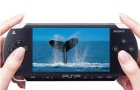
Download PSP Overlay TitleFollowing my series of custom Movie Maker image overlays, here's an overlay where your video appears on the screen of a PSP. This looks best with widescreen video, but you can use standard 4:3 video too.

To install: Click on the image above which will download the custom PSP Overlay title. Once it is saved, run the installer which will copy the required image and .xml files.
To use the new title
  • Go to 'Tools' > 'Titles and Credits' > 'Title on the selected clip'.

  • Click on 'change the title animation'.

  • Under your list of one line titles should be a new one called PSP Overlay

  • Pick it then click 'Done'.

  • Stretch the title so that it extends for the length of your clip.


  • If you have any questions, feel free to post them in the original forum post that inspired this title.

    Sunday, September 02, 2007

    Custom TV Overlay for Windows Movie Maker

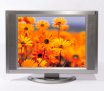
    Download TV Overlay TitleOne of the neat things you can do with custom titles is to resize the video and overlay an image. Using this technique, you can easily overlay an image of a TV screen, for example. (Click here for a sample video with a TV overlay).

    Note: This title has been designed to work with either the XP version or the Vista version of Movie Maker. It also works whether your project has a 4:3 or 16:9 aspect ratio.

    To install: Click on the image above which will download the custom TV Overlay title. Once it is saved, run the installer which will copy the required image and .xml files.
    To use the new title
  • Go to 'Tools' > 'Titles and Credits' > 'Title on the selected clip'.

  • Click on 'change the title animation'.

  • Under your list of one line titles should be a new one called TV Overlay

  • Pick it then click 'Done'.

  • Stretch the title so that it extends for the length of your clip.


  • If you have any questions, feel free to post them in the original forum post that inspired this title.