Thursday, December 29, 2011

Blaine's TV Signal Effects

Blaine's TV Signal Effects
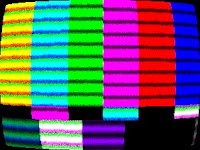
Back in the "old" days, we all had analog TVs where the picture was drawn by an electron beam on a cathode ray tube (CRT). The resulting picture often had noise in the signal, visible scan lines and a slight curvature to the screen. Well, now you can relive those days by applying one of my TV Signal Effects. These effects work with Windows Movie Maker 6.0 (either under Vista or Windows 7).

To install the TV Signal Effects into Windows Movie Maker, you have a choice of installers depending on whether you are running WMM 6.0 on a 64-bit or 32-bit version of Windows. Pick the correct installer and it will put the necessary files into C:\Program Files\Movie Maker\Shared.
Windows Movie Maker 6.0:
Blaine's TV Signal Effects (64-bit) Installer
Blaine's TV Signal Effects (32-bit) Installer
After restarting Windows Movie Maker, you should have 4 new TV Signal effects with corresponding icons:
  • TV Signal (All) - all 3 effects applied at once (curvature, noise and scanlines)
  • TV Signal (Curvature) - distorts the picture to give it a slight curvature.
  • TV Signal (Noise) - adds some random "dot crawl" to the clip.
  • TV Signal (Scanlines) - draws the screen in bands of light and dark, with some color fringing.


  • You can apply the individual effects, or just use the combined TV Signal (All) effect. You might also want to apply a Blur effect or Grayscale effect, especially if you are simulating a black and white TV, or maybe a surveillance monitor.

    Note: These transitions require the architecture of WMM 6.0 and can't be made to work on versions 2.6 or earlier.

    Monday, December 12, 2011

    Blaine's Custom Transition Pack 3 (Paper Fold)

    Blaine's Transition Pack 3Before the end of the year, I wanted to publish another set of transitions for Windows Movie Maker 6.0*. These are called "Paper Fold" transitions which will be obvious if you watch the Transition Pack 3 - Sample Video.

    These transitions require the use of Rehan's ShaderTFX add-on. If you've never installed this before, follow the directions and test they work first. If you've already installed a copy of ShaderTFX (registered or unregistered), you can skip these steps.

    There are two installers depending on whether you are running WMM 6.0 on a 64-bit or 32-bit version of Windows. The installer will put the necessary files into, C:\Program Files\Movie Maker\Shared.
    Prerequisite: Rehan's ShaderTFX add-on.

    Windows Movie Maker 6.0:
    Blaine's Transition Pack 3 (64-bit) Installer
    Blaine's Transition Pack 3 (32-bit) Installer

    After restarting Windows Movie Maker, you should have 7 new Paper Fold transitions with corresponding icons. They all look like the screen is being folded down the middle and then it opens up to the new clip. The only difference between the clips is the color background that appears.

    *Note: These transitions require the architecture of WMM 6.0 and can't be made to work on versions 2.6 or earlier. For anyone that wants to customize the background color, check the .xml.

    Saturday, October 08, 2011

    Custom Camera Shutter and Letterbox Effects for Windows Movie Maker 6.0 (Updated)

    Preview Blaine's Letterbox EffectsUpdated! This package has been updated with a camera shutter effect and white letterbox bars. Enjoy!

    There have been lots of requests on the forums for a letterbox/widescreen effect which adds bars to the top and bottom of your video. Well, I went one step farther and added a couple more effects that let you have the bars appear and disappear. Here's a sample video of the moving letterbox effects.

    Note: These effects take advantage of the effects architecture of Windows Movie Maker 6.0 and therefore will not work in XP. There are other solutions for XP such as a letterbox title.

    There are two installers depending on whether you are running WMM 6.0 on a 64-bit or 32-bit version of Windows. The installer will put the necessary files into, C:\Program Files\Movie Maker\Shared.
    Windows Movie Maker 6.0:
    Blaine's Letterbox Effects (64-bit)
    Blaine's Letterbox Effects (32-bit)
    After installing, you'll have new effects called:
  • Camera Shutter - quick in and out (New)

  • Letterbox - static letterbox in black

  • Letterbox (In) - adds letterbox in black

  • Letterbox (Out) - removes letterbox in black
  • Letterbox White - static letterbox in white (New)

  • Letterbox White (In) - adds letterbox in white (New)

  • Letterbox White (Out) - removes letterbox in white (New)
  • Blaine's ASCII Text Effects for Windows Movie Maker 6.0 (Updated!)

    Blaine's ASCII Text EffectUpdated! This package has been updated with 3 different effects (Text, Binary and Japanese). Enjoy!

    Have you heard of ASCII Art? It's a method of drawing pictures using just the characters on your keyboard. How cool would it be if you could apply an effect in Windows Movie Maker to have your photos or videos instantly converted to ASCII Art? Well with my latest ASCII Text effects you can do it very easily.

    A couple notes:
    These effects require a registered copy of Rehan's ShaderTFX add-on. It will also work if you are still within the trial period of ShaderTFX. If you've never installed ShaderTFX before, follow the directions and test that his transitions and effects work first. If you've already installed and registered a copy of ShaderTFX, you can skip these steps.

    For a preview of what these effects look like, check out Blaine's ASCII Text Effects (Updated)

    For the new effects, there are two installers depending on whether you are running 64-bit or 32-bit version of Windows. The installer will put the necessary files into, C:\Program Files\Movie Maker\Shared.
    Prerequisite: Rehan's ShaderTFX add-on (registered or unexpired!).

    Windows Movie Maker 6.0:
    Blaine's ASCII Text Effects (64-bit) Installer
    Blaine's ASCII Text Effects (32-bit) Installer

    After restarting Windows Movie Maker, you should have three new effects called:
  • ASCII Binary - Uses just zeroes and ones

  • ASCII Japanese - Uses Japanese katakana symbols

  • ASCII Text - Uses letters, numbers and symbols


  • Just apply one of these effects to your video like any other effect. Often you may want to apply a 'Brightness, Increase' once or twice, or a Blur effect to your clip before the ASCII effect. Brightness added afterwards can also help.

    *Note: These effects require the architecture of WMM 6.0 and can't be made to work on versions 2.6 or earlier, nor will it work on Windows Live Movie Maker.
    Tuesday, August 02, 2011

    Blaine's Custom Transition Pack 2 (MultiSlide)

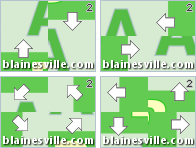
    Blaine's Transition Pack 2Time for another pack of transitions for Windows Movie Maker 6.0*. I call these "MultiSlide" transitions. Check out the Transition Pack 2 - Sample Video and you'll see why.

    These transitions require the use of Rehan's ShaderTFX add-on. If you've never installed this before, follow the directions and test they work first. If you've already installed a copy of ShaderTFX (registered or unregistered), you can skip these steps. There are two installers depending on whether you are running WMM 6.0 on a 64-bit or 32-bit version of Windows. The installer will put the necessary files into, C:\Program Files\Movie Maker\Shared.
    Prerequisite: Rehan's ShaderTFX add-on.

    Windows Movie Maker 6.0:
    Blaine's Transition Pack 2 (64-bit) Installer
    Blaine's Transition Pack 2 (32-bit) Installer

    After restarting Windows Movie Maker, you should have 7 new transitions with corresponding icons:
  • MultiSlide (2 columns) - Each column slides in opposite directions

  • MultiSlide (2 rows) - Each row slides in opposite directions

  • MultiSlide (many columns) - Each column slides in opposite directions

  • MultiSlide (many rows) - Each row slides in opposite directions

  • MultiSlide (quad diagonal) - Each corner moves in a different diagonal direction

  • MultiSlide (quad orthogonal) - Each corner moves in a different compass direction

  • MultiSlide (weaving) - Lines and columns appear to weave in and out.


  • *Note: These transitions require the architecture of WMM 6.0 and can't be made to work on versions 2.6 or earlier.