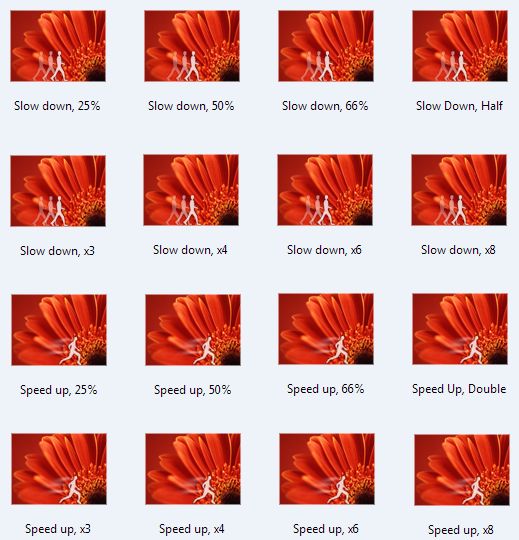
 Movie Maker comes with a couple standard effects to speed up or slow down your video. If you find that you need more control over the speed, you can download these custom Speed Effects with different incremental speeds.
Note: These effects have been designed to work with either WMM 2.1 (XP) or WMM 6.0 (Vista) version of Movie Maker.
There are two installers depending on whether you are running on a 64-bit or 32-bit version of Windows. The installer will put the necessary files into, C:\Program Files\Movie Maker\Shared.
Blaine's Custom Speed Effects (64-bit)After installing, you'll have new custom speed effects for
Blaine's Custom Speed Effects (32-bit)
Very cool. Tx so much.
ReplyDeletehello i have downloaded you software but come up with and error on one of your files can you help???
ReplyDelete(Customspeedeffects[1]msi)
Alex,
ReplyDeleteTry saving the installer to your computer, then running it.
lol i tried that aswell but it still does not work
ReplyDeleteim having the same problem as alex blaine.. any suggestions? could you maybe put the xmls and images (if you have them) in a zip or rar file to download?
ReplyDeleteBlain, Thanks for all the custom transitions and effects for Vista! I have run into a problem with the "slow down effects w/MM. Several of them that are marked "slow down" and actually speeding up my video. Has anyone else had this happen to them? Is there a fix? I already tried re-installing them?
ReplyDeleteHelp......!
I double-checked the XML files and all the speed settings are correct for the slow down and speed up effects. I would check that you aren't using an incompatible clip type like DivX or XviD.
ReplyDeletehey, a long time ago i asked you if there was anyway to make it look like a fast forward or rewind bars on the screen and you told me about a website where you can learn how to make xmls and stuff like that, you remember or got any?
ReplyDeleteJust, thanks! :)
ReplyDeletehow do yo acsess the speed effects?
ReplyDeleteIf you go to Tools > Video Effects, you should see the icons for the new Speed Up and Slow Down effects at different speeds. Drag them over your clip to change the speed accordingly, just like you would for any of the standard effects.
ReplyDeleteI dont have anything new does it require you to reboot your computer?
ReplyDeleteNo reboot necessary, but you do need to shut down Movie Maker and start it again. Are you, by any chance, on a 64-bit version of Windows? What version of Movie Maker are you using? (Check Help > About and post all the information found)
ReplyDeletehey..i am on 64 bit version of the windows.. and im having a problem >.<
ReplyDeleteI just ran the program and it didnt do anything so than i saved it on desktop and run it that way but than i got an error message, it says error has occur while reading the file.
>.< please help.
The installer was designed for 32-bit Windows. Look under your 32-bit Program Files for Movie Maker, AddOnTFX. Move the contents of that folder under your 64-bit Program Files directory.
ReplyDeletethanks for the help, that worked. I have a question for you, i thought this program was goign to do what i thought it was goign to do but found out it didnt. The program is awesome, no question about it. i wanted to know if you could speed up the video when it gets to certain part and than resume with normal speed with one video on Windows Movie maker.
ReplyDeleteIs that possible?
To do that, just split it into separate clips. Apply the desired speed effect just to the part in the middle that you want to be faster (or slower)
ReplyDeleteThank you it works very well!
ReplyDeleteHey, i was wondering about the one of the comments above, saying is there away to do rewind bars and stuff like that. Have any idea what kind of site teaches you how to make movie maker effects?
ReplyDeletehow did you make these, visual studio?
ReplyDeletei clicked on tools and then effects, but it's not there! help...!
ReplyDeleteMop, I need more details from you. Which version of Movie Maker are you using (go to Help > About). Also, are you on a 64-bit version by any chance?
ReplyDeletecan anyone pls help me?? i have windows vista, dwonloaded the file saved it, and runned it and it gives me a error what am i supposed to do? save it somewhere else? thx
ReplyDeletewarcraftlife, do you have full administrator rights to your PC? What was the error?
ReplyDeletewhen i used this it just started only playing half my video?can u help?
ReplyDeleteThis is a very helpful installer, however a few more speeds would be AMAZINGLY helpful. Since it's just a slight edit to the XML coding, speeds in 20% increments or 10% would be great. I made a video and 75% slower would be great, but i'm left with either 50% or half (100%). I need to hit a specific time and that would be awesome. Any easy way to get the files and make the edits myself?
ReplyDeleteMarketing guru... problems like seeing half your video are usually associated with the file type. If you aren't using WMV or DV-AVI you can get strange problems when applying any effects.
ReplyDeleteDevilRipper, look in the C:\Program Files\Movie Maker\Shared\AddOnTFX folder. There will be a couple XML files there. Open the one that corresponds to XP or Vista with Notepad. The comments in the file explain how to edit the speed settings.
ReplyDeleteBlaine, I made the changes as suggested. I want to be able to take a 30 to 60 minute video and get it down to about 1 to 2 minutes so I added a 15, 20 and 30x speed up. However the changes do not show up. Anything else I need to do?
ReplyDeleteThanks. This add on once tweaked to the right time frame will be a huge help!
Hey Blaine, thanks for all the help. I used the plugin on my older xp machine with movie maker and it worked perfectly. I was excited it worked. I am now trying to do the conversion on my new laptop with vista and having troubles. I noticed your post advising to put the link into the addontfx folder for the 64 bit programs. I actually have a program folder that says x86 and im assuming that is 86 bit? do I need to do something different for this? I downloaded the link to the progam filesx86 and it doesnt seem to work, any help would be great, Thanks
ReplyDeleteRich, Did you create new versions with those speeds or did you just modify the current ones in the file? Also, did you restart Movie Maker after changing the file? Finally, did you make the changes in the file matching your OS (XP or Vista)?
ReplyDeletedaveride155, I don't have a 64-bit Vista machine to test this, but basically you need to find where Movie Maker is installed. I think it is under the x86 folders. Find Movie Maker and duplicate the contents of the Shared/AddOnTFX folder from the 64-bit Program Files folder to the other. Restart WMM and see if it works.
ReplyDeleteBlaine, I copied the file into the shared addontfx file for both my program files on my vista. No luck with either, basically I have two program file folders next to eachother, one says program files and one says program files x86 both folders have movie maker in them and both have the shared folder however the plain program files folder has a common.fxh file and a parity.fx file but no AddOnTFX? The program folder x86 has the shared/AddOnTFX folder but there is nothing in it, I dont know if that helps but still confused why it wont work on this machine? thanks for you help I appreciate it. Any Ideas? Im basically just looking to slow film down 30%
ReplyDeleteOkay, I think I know what is happening. My installer ends up creating a tree of folders under 'Program Files (x86)' which is Movie Maker\Shared\AddOnTFX. This really needs to go under just plain 'Program Files'. Here's the simplest solution:
ReplyDelete1) Reinstall the effects. This will put the two .xml files in Program Files (x86)\Movie Maker\Shared\AddOnTFX.
2) Navigate to Program Files (x86)\Movie Maker folder
3) Right-click on the 'Shared' folder and choose 'Copy'
4) Navigate to Program Files.
5) Right-click on 'Movie Maker' and choose 'Paste'
The result should be a folder tree of:
Program Files\Movie Maker\Shared\AddOnTFX. The .xml files should be in the AddOnTFX folder and then it will work.
Thanks man it worked. Does the speedvista.xml folder have to remain in both program files to work or can I delete it from the program file X86 ? Thanks for all the help, really appreciate it.
ReplyDeleteYou can delete the tree under x86.
ReplyDeleteBlaine, in regard to your questions about me modifying the script. I believe the problem is I am a moron. I was installing XP on a separate drive and had XP on the brain. Yet, I normally use Vista. I went and changed the right file and it seems OK.
ReplyDeleteBlaine!! You're a genius! Thank you so much for this awesome program and the ease in it's installation!
ReplyDeleteAt first it did not appear in moviemaker because I had to follow your detailed instructions above and copy and paste from the x86 moviemaker file to the regular moviemaker program file, but then it worked great.
I needed something to speed clips up but NOT AS MUCH AS 2X, which is the only option in movie maker. Yours had 25%, but actually, that was still a bit fast, so I used a 66% increase, then a 50% decrease (so maybe around a 16% increase?) and it's perfect!! Just what we needed to fit the video into it's required length!
Thanks again; you were a HUGE help!
Hi Blaine,
ReplyDeleteI downloaded the file but when I go to tools>video effects it shows nothing new??
It would help alot thanks.
And it uses windows installer to install, then it says gathering iformation and doesn't do anything else.
ReplyDeletedrbonkerstj,
ReplyDeleteMore details please... what operating system are you on (XP/Vista32/Vista64)? Did you look under effects to see if you had more now?
I am on xp, yes i have checked under effects but there is nothing there
ReplyDeleteWhat's under your 'C:\Program Files\Movie Maker\Shared' folder?
ReplyDeleteNo, it is located in C:\ Program Files
ReplyDeletehow do you speed up the video?
ReplyDeleteIs there a way to rewind the clip? Not slowing down or speeding up.
ReplyDeleteI downloaded it and i cannt find where it is? please help?
ReplyDeletemines working pretty GOOD thanks a lot!
ReplyDeletei cant do it when i get it i dont see it
ReplyDeleteAfter figuring out going from 5 sec per to 4.5 sec per is 10% faster (1.10) and editing the XML worked like a dream.
ReplyDeleteThanks!
Thanking you kindly,
ReplyDeletemay good luck come your way,
as you have made,
a young girl happy today!
~Courtney
I just want to say thank you for this amazing tool! I am in the middle of fixing a video thanks to you :)
ReplyDeletei downloaded this but where is the xml document?
ReplyDeleteand if its already installed then its not on my WMM 2.6 im starting to get frustrated with all this
You are running version 2.6 which is actually the XP version. The installer puts the files under the Vista (6.0) version.
ReplyDeleteAll you need to do is copy all the files from the Shared/AddOnTFX folder that is under C:\Program Files\Movie Maker over to the 2.6 directory.
I run windows 7. it wont come right up in my windows live movie maker, Everything downloaded to the addontfx folder i am now trying to figure out to where i need to move this stuff to? please help!
ReplyDeleteThere has been no published way of creating custom transitions and effects in Windows *Live* Movie Maker. I'm still waiting for Microsoft to release details on how developers can extend the include transitions and effects.
ReplyDeleteSo until then, as noted above, these will only work in the original Movie Maker (not Live Movie Maker).
I'm running the old Movie Maker on Windows 7, but it won't work for me either.
ReplyDeleteIf you are running version 2.6, you have to manually copy the files to the correct location. After installing on Vista or Windows 7, the files end up under C:\Program Files\Movie Maker\Shared\AddOnTFX.
ReplyDeleteCopy these to an equivalent folder structure but where you have the 2.6 version installed.
Awesome!!! Loved it.
ReplyDeleteHi Blaine, I just find your blog today but this effects are very usefull. Thanks, you're great.
ReplyDeleteSílvio, Portugal
can you slow down audio?
ReplyDeleteYou can in the XP version of WMM... or you can download a freeware application called Audacity to do audio editing.
ReplyDeleteThanks so much for this Blaine! All the feedback you've been providing in the comments help a LOT! :D
ReplyDeleteIf ya running 64 windows, you can download movie maker 2.6 if you're running windows 7. What I did, I downloaded the effect. It went to the folder, Movie Maker, not Movie Maker 2.6. So what I did, I opened the Movie Maker folder, went to AddOnTFX, copied the 2 xml codes, and pasted it in AddonTfx folder in Movie Maker 2.6. Opened WMM and works grand :)
ReplyDeleteHey I have windows vista and I downloaded it but it doesn't work. Its saved in a download folder, should I move it to some other folder? Please help!
ReplyDeleteYou need to click and run the .msi file to get it to install.
ReplyDeleteHey Blaine, this WILL help alot, but I'm having trouble. I ran the file and it installed very fast, but now I look under tools > video effects and there is nothing there. I run Vista 32-bit and I'm not fab with computer so can you please explain in a bit of detail how to get it to work? thanks!
ReplyDeleteSophie, check under C:\Program Files\Movie Maker\Shared\AddOnTFX and make sure you have the new XML files relating to speed effects.
ReplyDeleteIf you do, make sure you have restarted Windows Movie Maker... also be sure you are running the 6.0 version under Vista, not the 2.6 version.
If you are running 2.6, manually copy the files from under the Movie Maker folder to the same location under the 2.6 version and try again.
I have windows 7 and the add-ons don't work. Is there anyways to make this work on windows 7?
ReplyDeleteRyan, Windows 7 doesn't have a version of Windows Movie Maker. It only has Windows *Live* Movie Maker which currently has no way to add speed effects like these.
ReplyDeleteOn the other hand, if you have loaded the WMM 2.6 version from Microsoft, you can install this and then copy the AddOnTFX folder from C:\Program Files\Movie Maker\Shared to the Shared folder where WMM 2.6 is installed.
can you help me,i can't speed up 25% or50,75%,it only 100%
ReplyDeleteTell me more about what version of Movie Maker you are on. Also what version of Windows and is it 32-bit or 64-bit.
ReplyDeleteim using windows 7, and google chrome.
ReplyDeletei have downloaded it, and have clicked the icon at the bottom, i then click run, as the only other option is cancel. it says Please wait as windows configures blains blah blah blah
it loads very quickly and then closes and nothing happens... help! i need this
Unless you've manually loaded an older version of Movie Maker from XP or Vista, you must only be running Windows Live Movie Maker. WLMM has a whole different architecture to WMM so you can't just expect WMM effects to work in WLMM.
ReplyDeletePretty cool! Loaded it up and it works great! only problem is that instead of showing the video sped up it just skips. Im trying to do a "how to" video and im attempting to speed up some of the more boring parts but it skips and it doesnt show all the movements....any idea how to get that to work?
ReplyDeleteHey Thanks for all the goodies,
ReplyDeleteI'm having some issues. I recently updated to Windows 7, but I cant stand Windows Live, so I downloaded Movie Maker 2.6. I'm having the same issues as some other guys. After I download, the effects don't appear in Movie Maker. I'm running 64 bit as well. Any help? Thanks!
The biggest problem is the 64-bit version. All my installers are 32-bit and as such, they always put the files in an incorrect location. However, all you have to do is search for the 'AddOnTFX' folder that is created. Put it under the WMM 2.6 Shared folder and you should be good to go. Remember WMM 2.6 is essentially a recompiled version of WMM 2.0 (XP) so only the XP type transitions/titles/effects will work.
ReplyDeleteIf you are interested in WMM 6.0, I've seen standalone installers that will get you the 6.0 (Vista) version. That's the one I use regularly on Windows 7. If you do it manually, copy the complete contents of the Movie Maker directory from a Vista computer and then register the DLLs one by one.
Ah thank you so much. That worked exactly as you said, so some of the Vista stuff didn't work. No biggy though. Gracias.
ReplyDeletei downloaded it but
ReplyDeleteit doesnt work
the effects dont show up...
i have windows live movie maker
so what do i do????:/
Read the comments above. These are for the XP and Vista versions of Movie Maker. WLMM won't work.
ReplyDeletethank you very much, this is very helpful
ReplyDeleteHey i don't even have video effects as one of my tools O_o how come or do i need to download a newer version of movie maker ??
ReplyDeleteT.F., Go to 'Help' > 'About Windows Movie Maker'. Tell me what information you see there.
ReplyDeleteHey could you pleaseee make something like this for the new windows movie maker! It would be of an enormous help.
ReplyDeleteThankyou
Read the comments above. These are for the XP and Vista versions of Movie Maker. Windows Live Movie Maker won't work.
ReplyDeleteIn other words, Windows Live Movie Maker (the version in the Essentials download), has a whole different architecture. Microsoft hasn't provided a way to vary the speed in WLMM so I can't give you any variations on that in the way of new effects. It's not me; it's Microsoft.
ReplyDeletehey, you said "Look under your 32-bit Program Files for Movie Maker, AddOnTFX. Move the contents of that folder under your 64-bit Program Files directory. " i don't know where to go! like, do i go to start>control panel>programs ? if not, where? i'm going crazy. sorry for my noob-ness. D:
ReplyDeleteChindian,
ReplyDeleteMy Computer > C: Drive > Program Files
wow, thanks!
ReplyDeleteTHANK YOU SO MACH YOU JUST MADE MY DAY!!!!!!!!!!!
ReplyDeleteDo you have it for Windows 7?
ReplyDeleteWindows Live Movie Maker (the version in the Essentials download), has a whole different architecture. Microsoft hasn't provided a way to vary the speed in WLMM so I can't give you any variations on that in the way of new effects. It's not me; it's Microsoft.
ReplyDeleteThe only option would be if you load WMM 2.6 or WMM 6.0 on Windows 7. See my post on Installing WMM 6.0 on Windows 7.
this has no viruses right
ReplyDeleteIt's my own creation; I wouldn't want to be giving anyone viruses. It's been scanned with MSE. But you should have an virus program installed for your own safety anyway and not just take my word. :-)
ReplyDeleteI recently got Windows 7 and I decided to re-install Windows Movie Maker 6.0. Everything was fine until I found out that I didn't have your custom speed effects. I ran the installer and went back to see if my Movie Maker obtained the new effects. Nothing appeared, but when I checked the Programs and Features in my Control Panel, I saw that the speed effects were installed. Is there any way to fix this problem? Thanks for your help!
ReplyDeleteCheck the comments above about 64-bit Windows. I think you just need to copy the 'Shared' folder to the correct location.
ReplyDeleteomg thank you so so much..ive been looking online as to how can i speed up and slow down than whats already on movie maker..and have downloaded loads if programs that work ...so just thank you.
ReplyDeleteThank you so much, download worked a treat!
ReplyDeleteOkay, I downloaded it, and nothing happened... I closed windows live movie maker, and still, I noticed no difference...Help?!
ReplyDeleteAshley, these are for Windows Movie Maker (WMM), not Windows Live Movie Maker (WLMM). If you have the latest beta version of WLMM it has new speed effects already.
ReplyDeletedo you have effects that can speed up the video less than 25%? 5% or 10% would be prefect for what I need...
ReplyDeleteThe file is called:
ReplyDeleteC:\Program Files\Movie Maker\Shared\AddOnTFX\Speed.xml
Make a copy of that, open it in Notepad. There are instructions at the top for adding additional speeds to the list. When done, save a copy back in the original directory.
C:\Program Files\Movie Maker\Shared\AddOnTFX
hiya,
ReplyDeletei have a slideshow with just less than 500 pictures and i needed to increase the viewing time from 2 seconds to 3 seconds and this was absolutely perfect, thank you so much!
Thanks Sooooo Much !!
ReplyDeleteWhere do I find my effects after I installed them? What folder, and I checked in windows movie maker's effects and their not there. How do I import them there?
ReplyDeleteMistywolfgal, what version of Movie Maker do you have (2.x or 6.0?). And are you on a 32-bit or 64-bit version of Windows?
ReplyDeleteIt Said That The Link Was Broken :(
ReplyDeleteHelp?!
Blaine, i downloaded the newest version of WMM (6.0) and i also have windows live movie maker, i installed the custom speed edit and it doesn't show up on my WMM, i followed your directions on how to find it, and no luck.
ReplyDeleteAngel, try it now. It should be working again.
ReplyDeleteTreehugger, what files do you see in C:\Program Files\Movie Maker\Shared\AddOnTFX?
ReplyDeleteAhw,thankyou :') !
ReplyDeleteIts works great !
I have 6.0
ReplyDeletealso, i don't really know what you're saying about the 32-bit or 64-bit thing.
All I can really tell you is that I have Windows Vista and I have the 6.0 version. Sorry!
Oh, silly me, nevermind! I found where to find the effects..in the effects tab -laughs- thanks so much!
ReplyDeleteAlso, do you or can you make a custom background, because I dont have a green screen and I thought it would be cool to change backgrounds in pix and vids!
Misty, the whole reason people use green screens is that computers aren't able to discern what is foreground and what is background. But if you make it easy and use a solid green background, the computer "knows" that green is what should be ignored. There is no easy way to take any random clip and tell the computer to replace the background.
ReplyDeleteOh okay, because I've seen people with a big cardboard behind them, and they painted it green. Also, after you upload your video, isn't there a website or place to choose your background? Like some people have an outerspace background or whatnot.
ReplyDeleteIf you can film in front of a solid green or blue background, you can use the "Chroma Key" transitions in Rehan's ShaderTFX package. Place the background clip (or image) and the foreground clip (with the solid background) on the timeline. Put the correct Chroma Key transition (green or blue) between and overlap the two clips. You can use whatever footage you want in place of the solid color. You don't need one special transition/effect for each background.
ReplyDeleteCheck it out. You can even continue to use the Chroma Key transitions after the trial period without having to pay the registation fee. They don't time out.
If you do this though, be sure your background is well lit and very smooth. You can use a colored sheet, posterboard, a painted wall, etc.
Thank you. So, I can find any picture on Google and it could be my background?
ReplyDeleteAlso, is therea price on the package or is it free?
Misty, You can put any clip (picture or video) in the background and your green/blue screen clip in the front. The package is currently $15 if you want all the features, but there is a free trial. And after the 15 days, you can still use the Chroma Key stuff.
ReplyDeleteRead more here
how do you use them???
ReplyDeleteJust like the standard Speed Up, Slow Down effects. Go to Tools > Effects. Find the icon and either drag it over your clip, or right-click and choose 'Add to Timeline'.
ReplyDeleteHi Blaine,
ReplyDeleteI had a moviemaker 2.6, but then found your 6.0 version so i installed it, none of your effects that i downloaded showed up,
then i copied them from my 2.6 folder, and uninstalled the 2.6 movie maker it self.
when i copied the moviemaker folder from program files to programfiles(x86) and copied the effects to the tfx-shared folder, still nothing happened, no new wffects showed up, what should i do?
i am somewhat confused about the directory of my new moviemaker6.0 as well, why did it show up in the programfiles folder, instead of programfiles(x86)
thanks alot
Ivan, you have a 64-bit version of Windows 7, so the 64-bit version will go in Program Files. All my Vista/WMM6 transitions/effects have a 32-bit installer that will put them all in (x86). The solution is simple; copy everything from the C:\Program Files(x86)\Movie Maker\Shared folder to C:\Program Files\Movie Maker\Shared.
ReplyDeleteAs for your WMM 2.6 transitions/effects, those are XP/WMM2.x versions that aren't compatible with Vista/WMM6.0. WMM6.0 has a whole new TFX architecture.
just want to say thanks buddy
ReplyDeleteMerle, you have WMM 2.6 which isn't under C:\Program Files\Movie Maker.
ReplyDeleteCopy whatever gets installed by my program into C:\Program Files\Movie Maker\Shared over to the same folder under the Shared folder for WMM 2.6.
This was just what i needed for a class project, thanks so much!
ReplyDeleteBut I did notice in the description that it can slow footage down or speed it up by 25%, but the only option I found when making the actual video was "Speed Up, Double" and "Slow Down, Half"
@d1127shopping, those are just the standard speed-up/slow-down effects. That means you didn't get these custom effects installed correctly. Tell me more about:
ReplyDelete1) Which version of Windows you are running (XP, Vista or Win7) and whether it is 32-bit or 64-bit.
2) Which version of Movie Maker you are running (2.x or 6.0).
I'll try and help from there.
I tried doing what daveride155 has done. I copied and pasted the AddOnTFX onto my Program Files. The effects still do not appear on my Windows Movie Maker. What do I do?
ReplyDeleteCopy the AddOnTFX folder from:
ReplyDeleteC:\Program Files (x86)\Movie Maker\Shared
to
C:\Program Files\Movie Maker\Shared
hi blaine,
ReplyDeletei ve followed all your instructions, but there is no speed up tool on my movie maker. nothing new. what happen?
im using 32-bit.
Do you have a link to download the 32 bit ? because i have the 64 bit of Windows Live Movie Maker, & its actually really confusing havin to replace things & having it not working & not knowing what you did wrong.
ReplyDelete@san_papiloo, I assume you are running WMM 6.0 and it is in C:\Program Files\Movie Maker? The installer doesn't handle WMM 2.6.
ReplyDelete@kellynguyenn, none of these will work with Windows Live Movie Maker. These are only for the original Windows Movie Maker.
ReplyDeleteWorks in Windows 7?
ReplyDelete@Meatlocker, I've answered this already. If you load Windows Movie Maker 6.0 on Windows 7, yes it will work with that. It will not work with the Windows Live Movie Maker that Microsoft has just recently created, but it already has multiple speeds on the 'Video Tools' tab.
ReplyDeleteThanks Blaine, for the effects
ReplyDeleteI opened the file, ran it, and selected "Yes" to the pop-up (the one asking permission to allow the file to be opened). I opened WMM 6 in my Windows 7, checked the effects category, and they weren't there. Help anyone?
~Hyoue
You must have a 64-bit version of Windows. Check the one of the prior posts.
ReplyDeleteHey I'm running windows movie maker 2.6 on a 64 bit operating system (windows 7) I tried to copy the AddOnTFX files from moviemaker to moviemaker 2.6 but they still don't show up in windows movie maker, also, and this might be why, the movie maker file isn't under program, that file and movie maker 2.6 are both under program files (86) for some reason...
ReplyDeleteWMM 2.6 is a 32-bit version so it goes under C:\Program Files (x86). So is this installer, so you'll get them both there.
ReplyDeleteIf you copy the *full* contents of AddOnTFX from C:\Program Files (x86)\Movie Maker\Shared\AddOnTFX to C:\Program Files (x86)\Movie Maker 2.6\Shared\AddOnTFX you should have the XP version of the speed effects.
(WMM 2.6 is based on XP version of WMM).
i was trying to see where would it be @ iin windows movie maker? I cant find it??????
ReplyDeleteTools > Video Effects
ReplyDeletei cant find it, i got windows 7 :/
ReplyDelete@AJ Blogger, are you using WMM 6.0 or Windows Live Movie Maker? If WLMM 2011, this only works in WMM 6.0. If you have a 64-bit version of Windows, read the comments above about copying.
ReplyDeletei jusst downloaded it and i have windows live movie maker i opened it and nothings ther! also theres no tools option at the toop of the screen!
ReplyDelete@Adam, read the comments above. These are for the XP (2.x) and Vista (6.0) versions of Movie Maker. Windows Live Movie Maker won't work.
ReplyDeleteThat said, if you have the latest version of WLMM, it already has various speed choices. If you click on 'Video Tools', there's a drop-down for speed and it has choices for 1/8, 1/4, 1/2, 2x, 4x, 8x, 16x, 32x and 64x.
It works, but it's all choppy! Like when I fast forward the video, it speeds it up but it just plays the video, pauses, then skips to a different part of the video, pauses, etc.! Is this supposed to happen??
ReplyDelete@Shannon, no that's not how it's supposed to work. If you haven't already, convert your video file to .wmv format and try that. Also, if you have .mp3 audio, convert it to .wma instead.
ReplyDeleteI have Windows 7 and I'm using WMM 2.6
ReplyDeleteI installed it, but it's not appearing in WMM. So I uninstalled it, put it in the AddOnTFX file in Program Files, and tried again but it's still not there...?
@darkdalmation, Is there a reason you aren't using WMM 6.0 on Windows 7? WMM 2.6 is really an interim version for those that are unable to run WMM 6.0. As a result, it installs in a non-standard directly. You'll have to copy everything from the C:\Program Files\Movie Maker\Shared folder (including the AddOnTFX subfolder) to the corresponding location where WMM 2.6 is installed.
ReplyDeleteAlternatively, just install WMM 6.0 on Windows 7 and the installer will know what to do. Additionally, you'll be able to use all the cool WMM 6.0 transitions and effects I've created.
^typo = non-standard directory
ReplyDeletein jus one word''GENIUS''
ReplyDeleteI've updated the installers to have both a 32-bit and 64-bit version. If you've had problems before with a 64-bit system, the new installer should help.
ReplyDeleteOkay so I downloaded it and I have a Windows 7 with Window Live Movie Maker but I don't know how to get to the effect, I mean I seen your previous comments which said > Just go to Tools > Video Effects. BUT, I don't know how to get there! Please, help.
ReplyDelete@Samantha, there is very little customization that can be done in Windows Live Movie Maker. These speed up effects are for the original Windows Movie Maker, not for WLMM.
ReplyDeleteWLMM is a "simpler" version of Windows Movie Maker which some people prefer. But if you want more features, you can install WMM 6.0. The good news is you have both WLMM and WMM on the same PC.
I will mention that in WLMM there are already a few more options for speed changes, so this add-on would be unnecessary in WLMM anyway.
Hey, i am using win7, i have wmm6.0 on it, i downloaded the 64bit installer for this and no new effects!! what do i do??
ReplyDelete@DeiDoDei,
ReplyDeleteMake sure you loaded a 64-bit version of WMM 6.0 so that it is installed in C:\Program Files\Movie Maker. If it is instead in C:\Program Files (x86) then you have a 32-bit version. Uninstall and reinstall the 64-bit version of WMM 6.0 using the menu option at the top of this blog.
Well I got my WMM 6.0 copy from a torrent, and it is installed in Program Files>Windows Movie Maker 6.0. That was the folder name the torrent host had. So, which files from that folder for 6.0 do I move into Program Files>Movie Maker??
ReplyDeleteThanks.
Hey! I fixed it, the speed effects are working now! thanks! i' ve downloaded numerous effects by you, and all successful! I tried to install the Torn Pages overlay title, but it says "A more recent verson of Blaine's Custom Torn Titles is already installed on this computer." It said that the first time I tried to install it here on my win7. Oh, and I recall you had an effect that made the camera shake, where can i get that at? It seems like it was bundled with other effects...? Thanks.
ReplyDelete@DeiDoDei,
ReplyDeleteI can't support versions installed in arbitrary folders coming from a torrent. I suggest either:
1) Renaming that folder to Movie Maker, or
2) Uninstalling and reinstalling using my installer (see top menu of my blog) so that it is installed in the correct folder.
Apart from that, you could manually move things everytime you install one of my transitions/effects/titles, but I leave that up to you.
@DeiDoDei,
ReplyDeleteGood job on figuring out your folder issue. Let me take a look at the Torn Pages overlay titles and see if there is a problem with the installer. As for camera shake, I had to remove that because my version wouldn't work consistently. It used to be part of the compositing and translucency pack. There are some shake effects if you check the forums.
@DeiDoDei, I've updated the installers for Blaine's Torn Pages Titles. Can try the installation again and let me know if it works for you now?
ReplyDeleteYes, it works! :D Where can I get a shake effect on the forums? and are they pretty much the same as yours?
ReplyDelete@DeiDoDei, one option is the Earthquake effect. There's another that's a little more rhythmic called Heartbeat. Neither are probably exactly like what I had before, sorry. :(
ReplyDeleteOK. Thank you, I downloaded both, and I like them. Thanks.
ReplyDeleteOh and just thought it'd be worth asking, even though the camera shake effect of yours was inconsistent, is there anyway I could possibly still download it? When I had it before it worked on one of my computers, but not the other; which was no big deal to me. I want a camera shaking effect that stays on screen, and doesnt twitch the clip to black borders...Guess more like a vibrate effect then.
ReplyDelete@DeiDoDei, sorry when I reworked my Compositing and Translucency transitions to work with ShaderTFX, I essentially threw out my custom transition code and went solely with Rehan's package.
ReplyDeleteIf anyone wanted to revive it, they could follow the steps on using Visual Studio 2005 to create custom transitions for WMM. Here's the link to sample code for the WMM 6.0 SDK. The jiggle effect is the one noted in the SampleTFX file.
I have the Windows Movie Maker Version 6 and I can't find the effects.... I've read through all the comments and I can't find where the Tools menu is on windows..... help?
ReplyDelete@personperson, please tell me more about your version of Windows and how you got WMM 6.0 on your system. If you installed WMM 6.0 from somewhere else, I recommend uninstalling it and then reinstalling using the link at the top of my blog (WMM 6.0 on Windows 7).
ReplyDeleteI have seen several comments from you on forums for WLMM. I have an issue that I can't seem to find an answer for, and was wondering if you could help me out.
ReplyDeleteIs there any way that I can "link" or "mesh" 2 MM projects/slideshows? I made 6 different slideshows for 6 different vacations(this seemed easiest for me since it was the first time using the program), with intent to just copy and paste them all into one later. But I can only open 1 project at a time, and the copy and paste doesn't seem to be working. I am really hoping I don't have to redo everything in one project since I have worked so hard at making each just right!!
Thank you for any help.
ElizaBeth
@Volleyball02/ElizaBeth, I prefer to leave this blog for specific questions about the effects/transitions I create. For the future, you should register on the Windows Movie Makers.net forums and ask a question like this there. Anyway, to save time, I will answer this question here just this once. While you can't easily combine projects together (nor would I think it is a recommended idea), you can join the movies you create. So open each of the individual projects, save them as a movie to your computer. Now open a new project, import the 6 movies and put them in order. Save this as a final movie. Alternatively, you can just download something like Freemake Video Converter and join the 6 movies together. That's another option.
ReplyDeleteHi Blaine, so happy to be able to use WMM again! Thanks for all your work!
ReplyDeleteI installed this speed effect from this blog, but seems like all the speeds are the same, not sure why. I see in the length of the video, and 3X 4X 8X all look the same. I use Win7 64 bit. Is there a way to fix it?
Thanks!
I assume you are using WMM 6.0 on Windows 7? I've got the speed effects installed and I see the correct increments. If I put the 3x effect on a 3 minute clip, it ends up as 1 minute. If I put the 4x effect on that same clip, it takes 45 seconds.
DeleteThings to check: make sure your video clips are 100% compatible with Movie Maker. Also, judge the speed in the final movie in case your PC isn't able to keep up with the preview.
Yes, it is version 6.1 on win 7, 64 bit. Every other effect I have installed works well, and only when i tried the faster speed i noticed that it was as long as the 2X, even the 8X , even after restarting and redoing the dragging of video clip to the timeline, so i figured there's something to fix.
ReplyDeleteI restarted everything again this morning and it worked fine, until I started to try again different speeds and it went all back to every speed measuring the same length. So I guess I should decide in one and don't mess with more speeds, seems to confuse the program ...?
I noticed the sounds match on 2X but not in any other faster speed. Is that normal? I will add music so it doesn't matter, but I noticed that's what happens.
Thanks!
I've tried to reproduce your issue but can't. However, it might be an issue with the similar "guids" that are used for each of these effects. I tried making them different, but then they stopped working at all, so that's not it.
DeleteAs for the sound, yes Microsoft designed WMM6.0 to remove the sound after speeding up past 2x. Incidentally, there is no version 6.1. That's the internal version of Windows. If you look down further in the Help > About Movie Maker dialog, you'll see the version number of Windows Movie Maker.
Oh wow.. in my menu it says 6.0, in the help file says 6.1, but further down it says 6.0.6002.18005 ...weird!
DeleteThe sound is there in my speed version, but choppy and out of synch. I have not saved a movie yet, have been just playing, but in the older version the sound goes mute, same for the LiveMM, so it got my attention than in this one the sound is still there.
Thanks again :o)
Gosh, I must have been thinking of the other versions too. I'm not sure how good the sound will be at really high speeds. If it isn't good, you can always mute it manually.
DeleteHello Blaine, thank you for all this.
ReplyDeleteI am running vista and the movie maker version is 6.0.6002.18273
When I go Tools there is no Video Effects option.
There is only Effects that leed to Fade out etc.
Could you help?
Thanks
That's correct, I meant Tools > Effects.
DeleteThat brings up all the built-in effects plus any custom effects that you have added. Please confirm that you have the effects added in C:\Program Files\Movie Maker\Shared\AddOnTFX folder. In addition to the standard Speed Up and Slow Down effects, you should now see some with other speeds.
I downloaded the Effects onto my 32-bit system. I clicked the link and no installer appeared, so after several minutes i clicked the link again. After waiting another several minutes i decided to open WMM and check, and the new Effects were right where you said they would be. But there is an issue, often when i'm in the middle of playing back a project i am working on in WMM or after i have published the finished Video, the audio for the clips i have applied the new Effects too are distored, and ruin the entire video. Should i consider changing the File Types of the Video Clips before i import them into WMM and apply the new effects to them?
ReplyDeleteI downloaded it, went on windows live movie maker but it isn't there.
ReplyDeleteThese effects only work on the "classic" versions of Movie Maker (e.g. WMM 2.1 from XP or WMM 6.0 from Vista. Microsoft has not published an API for customizing the newer versions.
DeleteSaved the day!!! Downloaded 32 bit file and was able to change speed with no problem.
ReplyDeleteI just ran across this and it is a lifesaver. I had to download the 64 and it worked like a charm. Thank you Blaine, you are terrific!
ReplyDelete